Loading version history...
PolyUtilities for PerfexCRM
Market:
Envato
PolyUtilities is the #1 solution for extending customization and enhancing the user experience in Perfex CRM, giving administrators and developers deeper control over the interface, features, and workflows.
Overview
PolyUtilities focuses on flexibility, extensibility, and integration, allowing you to turn Perfex CRM into a platform that fits your business needs without modifying the core code.
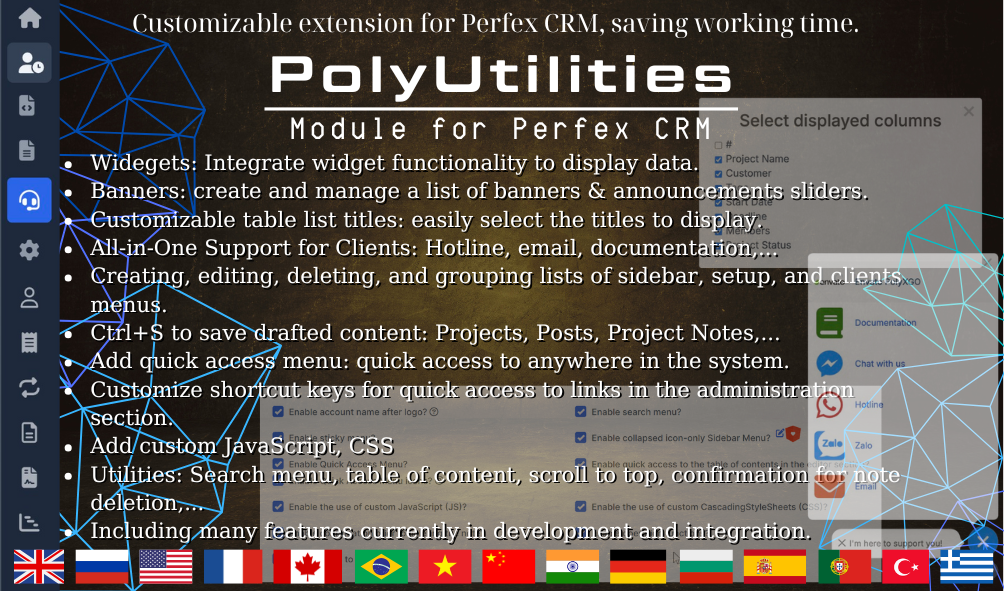
From custom menus, JS/CSS management, widgets, and banners to quick admin tools – everything is integrated into one unified module.
Unable to reach shortcode API endpoint: URL using bad/illegal format or missing URL
Key Features
Custom Menu & Quick Access
-
Create, group, and manage Sidebar, Setup, and Clients menus.
-
Assign visibility by Role and User.
-
Support for multi-level menus (2–3 levels).
-
Add icons, background colors, and custom CSS for each menu item.
-
Includes Quick Access Menu and Search Menu for fast navigation.
-
Custom Context Menu (Right-click) enables quick access to system components like invoices, customers, and projects.
Custom JS & CSS
-
Add and manage custom JavaScript and CSS directly in the admin interface.
-
Activate separately for Admin, Client, or both.
-
Integrated CodeMirror Editor for easier and cleaner code formatting.
-
Use for analytics, chatbot integration, widgets, tracking codes, or custom UI design.
Widgets System
-
Add custom display elements (Text, HTML, Image, Language Switcher, etc.) to supported widget areas.
-
Over 20 available hook positions such as sidebar, header, dashboard, footer, and login forms.
-
Extend display positions with developer-defined hooks.
-
Works like WordPress Widgets – easy to use, flexible, and no coding required.
Banners & Announcement Sliders
-
Manage banners and announcements across the system.
-
Support video iframes, HTML content, scheduling, and visual effects (fade, slide, zoom, rotate, etc.).
-
Display banners and announcements in both admin and client areas, as well as article pages.
All-in-One Support
-
Provide customer contact buttons for Email, Messenger, WhatsApp, Viber, and more.
-
Customize support messages and links.
-
Future update: Display assigned staff contact per project.
Extended Project & Data Tools
-
Manage project prefixes (APP-, CRM-, MOD-, etc.).
-
Quickly create Estimates, Proposals, and Contracts directly from the Project page.
-
Save custom column layouts per user for data tables (Customers, Invoices, Projects, etc.).
-
Support for personalized data filters and saved display layouts.
Other Utilities
-
Add breadcrumb navigation across core modules (Projects, Contracts, Invoices, etc.).
-
Support Ctrl+S shortcut when editing long content.
-
Confirmation dialog before deleting notes.
-
Fixed topbar and scroll-to-top button.
-
Copy customer emails or phone numbers directly from tables.
-
Auto-generate Table of Contents in articles or contracts.
Appearance & Login Page
-
Customize background, logo, and effects (rain, snow, matrix, etc.) for each login page (Admin/Staff/Client).
-
Add any custom JavaScript or CSS effects for a unique look.
Download & Backup Module
-
Export, backup, and share modules directly from the Perfex CRM admin panel.
-
Simplify module distribution and system maintenance.
Configuration & Permissions
-
Define which accounts have access to PolyUtilities.
-
Toggle individual features: Sticky Menu, Quick Access, Search Menu, Custom JS/CSS, Confirm Delete, Scroll Top, etc.
-
Import/Export menu lists for Sidebar, Setup, and Client areas to easily back up or migrate settings.
PolyUtilities - The All-in-One Customization Toolkit
A complete solution to extend, optimize, and personalize your Perfex CRM - powerful, flexible, and built for efficiency.
For products sold outside the site - for example, on Envato (CodeCanyon.net) - we are the exclusive authors under Envato’s platform. These products can only be sold and supported on Envato. Therefore, you cannot purchase them elsewhere if you wish to receive our official support and updates.
es. We handle feature integration based on customer requirements and descriptions. If a module has the features you need, you can send a separate request to polyxgo@gmail.com
You can download the product through the purchase receipt or your account dashboard. Installation steps are included in the documentation folder. For products on Envato (Codecanyon) access the Download section after you log in.
Yes, we provide basic installation and setup support for all purchased products.
Usage depends on the license type. Standard licenses typically allow one installation per purchase.
Updates are delivered through your account dashboard or marketplace where you purchased the product.
Please send us details, screenshots, and steps to reproduce the issue so our support team can assist you. You can create tickets on the system or email polyxgo@gmail.com.
Support duration follows the policy of the marketplace or package you purchased, typically 6–12 months.
Yes, all products include documentation to help you install and use the features. The data is connected to the system for each corresponding product project, and the documentation always provides the latest feature information and instructions from the project.
Yes, we offer custom development based on your requirements. For products sold exclusively and features already available on products listed on Envato, we integrate the additional features and update them through Envato. Only completely different features that require separate handling based on specific business workflows will be processed as a standalone service according to your detailed requirements.
Yes, we provide a live demo so you can test features before purchasing.
You can renew support through your marketplace account or by contacting us directly.

Product Information
Latest Version:
3.4.3
Compatible:
3.2.1 3.2.1+
Category:
Modules for Perfex CRM
Updated:
Nov 30, 2025
Created:
Nov 01, 2015
Sales:
120
licenses sold
Released:
Dec 07, 2023